Choose which sections appear on your invitation
Invitation sections you don't use, such as the countdown or gifts, can be hidden from guests. The settings live in Invitation settings, in a part made for your invitation's theme.
Where the settings are
| Theme | Where to set it | What you can set |
|---|---|---|
| Jingga | Invitation content › Invitation settings › Jingga theme look › Invitation sections | Ten invitation sections, one by one |
| Aruma | Invitation content › Invitation settings › Aruma theme display › Invitation sections | Seven sections guests can click |
| Other themes | No settings yet in Invitation settings | — |
The Jingga theme look part only appears for the Jingga theme, and Aruma theme display only for the Aruma theme. If you can't find either, your invitation uses another theme.
Jingga theme
- Open Invitation content › Invitation settings.
- Scroll to Jingga theme look. Its first part is Invitation sections.
- Turn off the switch next to a section you want to hide. Turn it on again to show it. Changes save automatically.
The sections you can set: Countdown, Love Story, Dresscode, RSVP, Wishes, Photo Gallery, Gift, Thank You, Navigation Menu, and Footer. A section that's turned off isn't shown on the invitation.
Aruma theme
- Open Invitation content › Invitation settings.
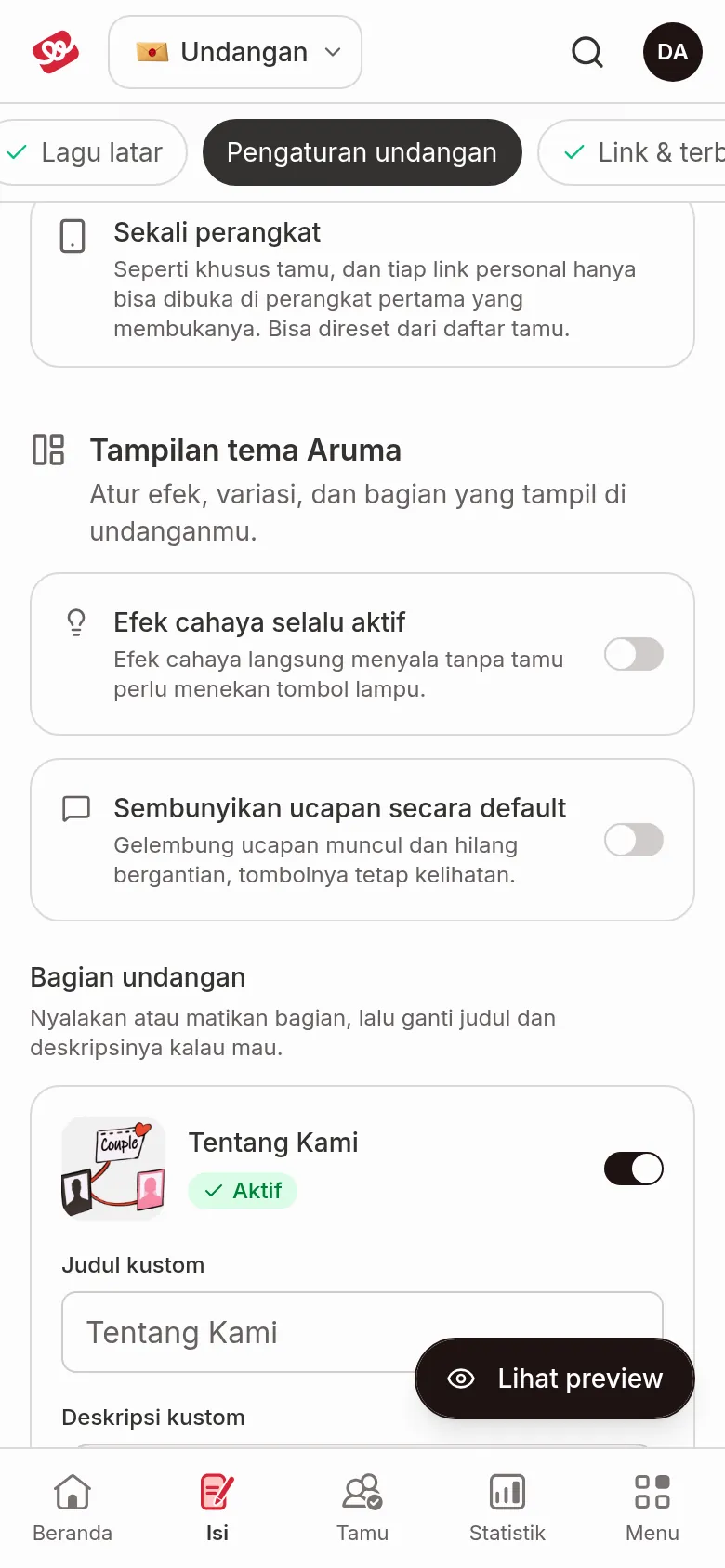
- Scroll to Aruma theme display, then to Invitation sections.
- Turn off the Show this section switch on the section you want to hide. Its label changes from Active to Inactive.
Sections in the Aruma theme are images guests can click to see more detail: About Us, Dress Code & Nuance, Our Love Story, Our Story Gallery, Time & Place, Guest Confirmation, and Gift & Prayers from Afar. These default names show in English in the list until you apply the Bahasa Indonesia Language pack or fill in a Custom title.
On an active section, you can fill in a Custom title and Custom description. Leave them empty to use the default text.
At the top of Aruma theme display there are two more settings:
- Light effect always on: the light effect is on right away, guests don't need to tap the lamp button.
- Hide wishes by default: wish bubbles show and hide in turns while the toggle button stays visible.
On the Janjian and Full Custom plans there are also General display variants, for example the opening button style. On a lower plan, this part shows locked.
Default texts and the Language pack are explained in Change Aruma text and decorations.
Hidden content stays safe
Hiding a section only changes what's shown. Its content, such as gallery photos or Love Story chapters, stays saved in its own section in Invitation content and appears again when you turn the section on.
Next steps
- Set up Jingga texts and look — change Jingga texts, colours, and decoration images.
- Change Aruma text and decorations — change Aruma default texts, cover, and Language pack.
- Change your invitation theme — pick another theme and its look.