Envelope balance and history
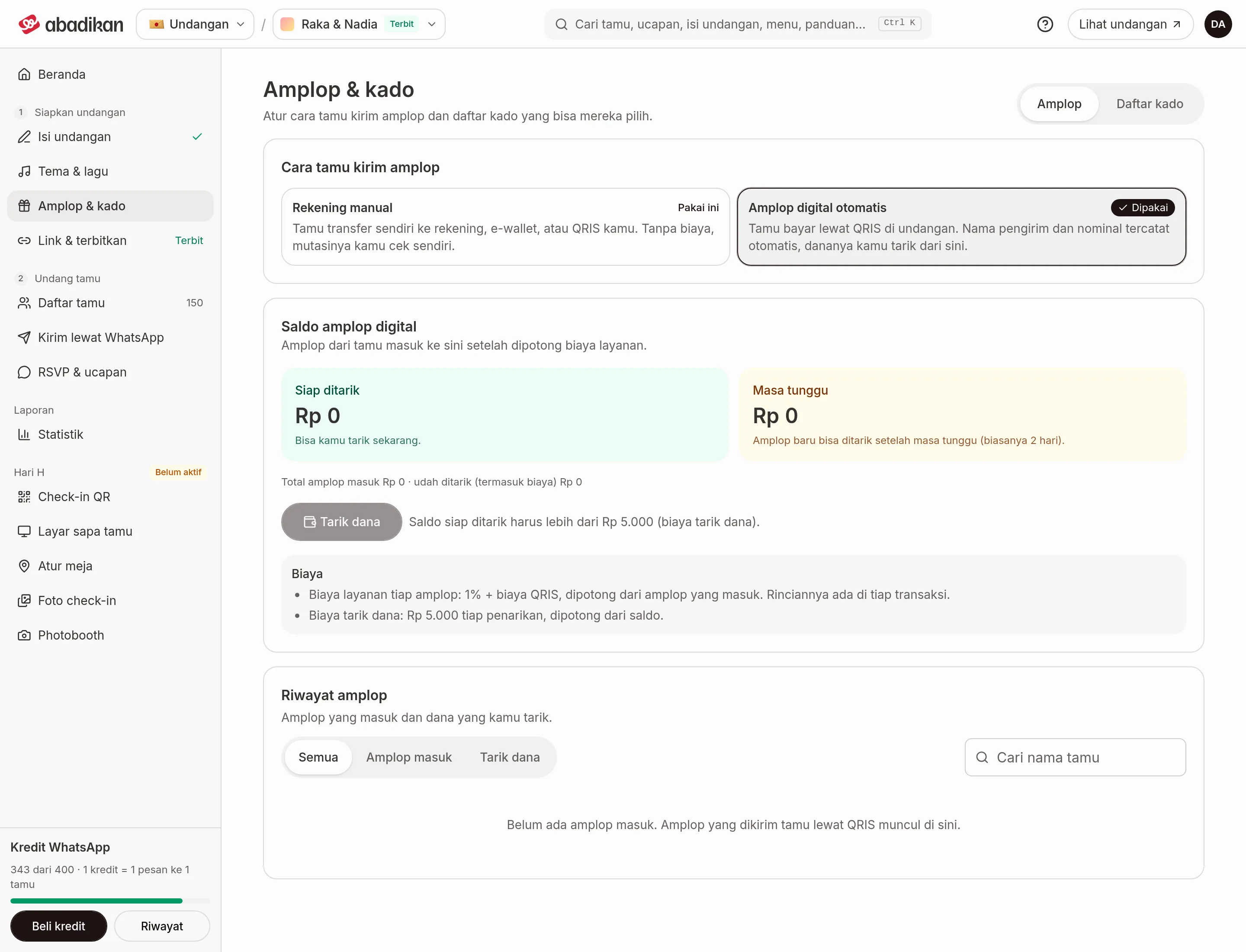
When the Automatic digital envelope is on, the Envelopes tab in Envelopes & gifts shows the Digital envelope balance with the Envelope history below it.
Digital envelope balance
Envelopes from guests land here after the service fee.
| Card | Meaning |
|---|---|
| Ready to withdraw | You can withdraw this now. |
| Waiting period | Envelopes can only be withdrawn after a waiting period (usually 2 days). |
Below the cards is a summary: the total of envelopes received and what you've withdrawn (including fees). The Withdraw button is active once the invitation is published and the balance ready to withdraw is more than Rp5.000 (the withdrawal fee). If not, the button is disabled and a note explains why. The steps are in Withdraw funds.
The Fees block sums up:
- Service fee per envelope: 1% + the QRIS fee, taken from each envelope as it comes in. Every transaction shows the breakdown.
- Withdrawal fee: Rp5.000 per withdrawal, taken from the balance.
Envelope history
A list of envelopes received and money you withdrew, 20 transactions per page. Use the Search a guest's name box and the filters above the list:
| Filter | What it shows |
|---|---|
| All | All envelopes received and withdrawals. |
| Received | Envelopes from guests. |
| Withdrawals | Withdrawals you requested. |
No envelopes yet? The list shows "No envelopes yet. Envelopes guests send by QRIS show up here."
Each row has a status label:
| Status | Meaning |
|---|---|
| Waiting period | Envelope received, can't be withdrawn yet. |
| Ready to withdraw | Envelope received, can be withdrawn now. |
| Processing | The withdrawal is being processed. |
| Completed | The withdrawal went through. |
| Failed | The withdrawal failed. |
| Cancelled | The withdrawal was cancelled. |
| Reversed | The money was returned. |
Transaction details
Click a row to open its details.
| Type | What shows |
|---|---|
| Envelope received ("Envelope from [name]") | Received (time), Sent by the guest, Service fee, Added to the balance, Withdrawable from, and Guest's phone if there is one. |
| Withdrawal | Requested (time), Amount withdrawn, Withdrawal fee, Taken off the balance, and Destination account. |
If the destination hasn't been chosen yet, Destination account says "Chosen on the Xendit payout page".
Next steps
- Withdraw funds — move your ready-to-withdraw balance to your account.
- What guests do — how guests send an envelope through QRIS.