Coupon list
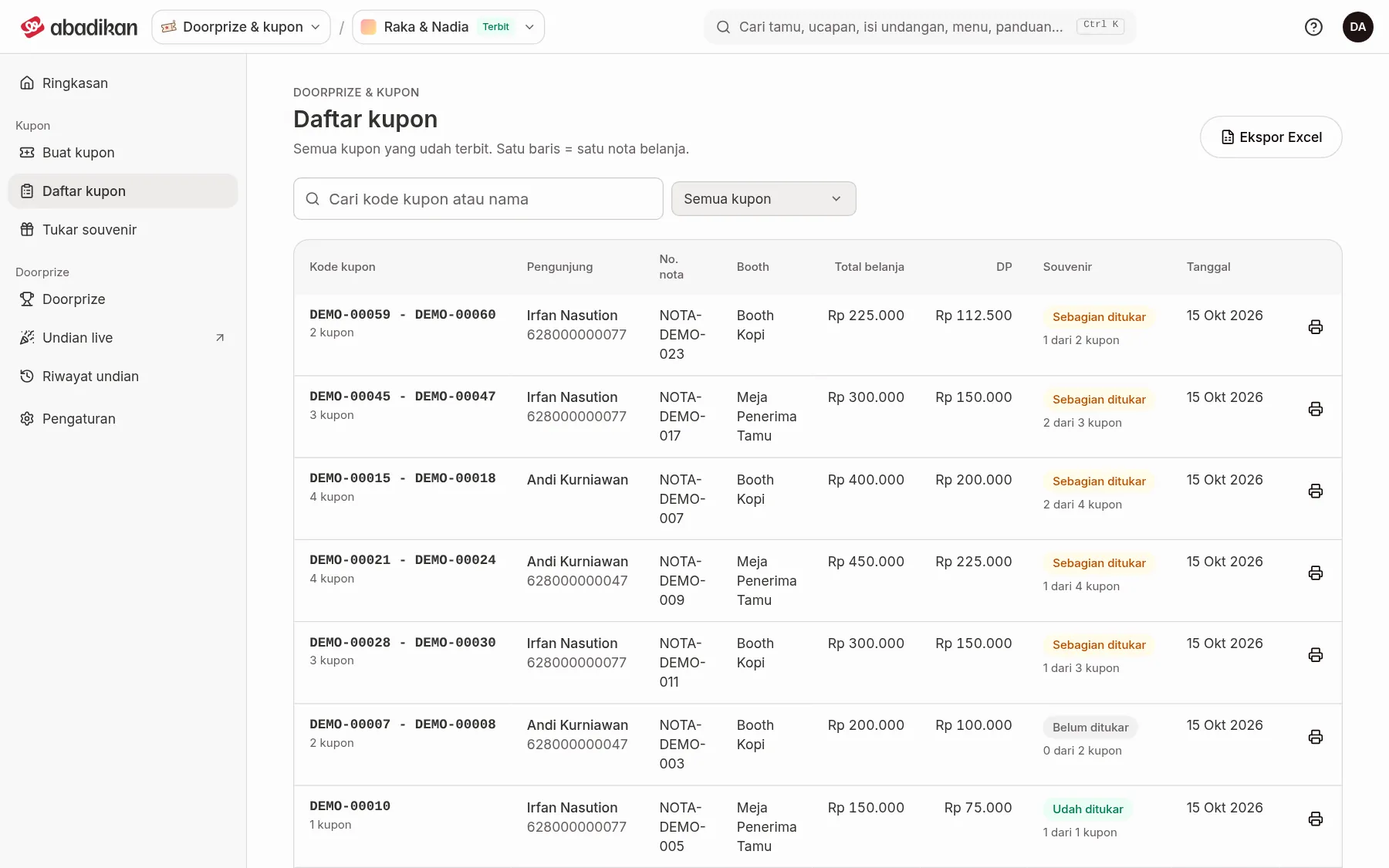
The Coupon list holds every coupon that has been issued. One row is one shopping receipt. From here you can view receipts, remove a receipt from the draw, and download an Excel summary.
What the columns mean
On a laptop this is a table. On a phone, each receipt shows as a card with the same information.
| Column | Meaning | Notes |
|---|---|---|
| Coupon code | The coupon code on that receipt, with how many there are ("3 coupons"). | With several coupons, the code is a range. |
| Visitor | The visitor's name and phone. | — |
| Receipt no. | The shopping receipt number the coupons came from. | — |
| Booth | The booth where the purchase was made. | — |
| Total spend | The value of the purchase. | — |
| Down payment | The down payment paid. | Coupons are counted from this. |
| Souvenir | Not redeemed, Partly redeemed, or Redeemed, plus a count such as "1 of 3 coupons". | Counted over every coupon code on that receipt. |
| Date | When the coupons were issued. | — |
| Actions | Receipt and Remove from draw / Put back in draw. | See below. |
A receipt that has been removed from the draw is marked Not in the draw.
Search and filter
- Type in Search coupon code or name. Results appear once you stop typing for a moment.
- Choose Draw status: All coupons, In the draw, or Not in the draw.
- Click Clear filters to return to all coupons.
The list shows 10 receipts per page. Move between pages with Previous page and Next page. If there are no coupons yet, the page shows No coupons yet with an Issue coupons button.
View a receipt or remove it from the draw
- Click Receipt to open the Coupon receipt dialog for that receipt, with the proof buttons set in Settings.
- Click Remove from draw if the coupons on that receipt shouldn't be drawn, e.g. the visitor isn't there. Read the confirmation dialog, then click Yes, remove. To undo it, click Put back in draw, then Yes, put back.
Download an Excel summary
- Set Draw status if you only need the coupons that are in or out of the draw.
- Click Export to Excel. An
.xlsxfile downloads and "The Excel file has been downloaded." appears.
Next steps
- Redeem coupons for souvenirs — record redemptions at the souvenir counter.
- Draw winners in the Live draw — draw coupons for door prizes.
Was this page helpful?