Invitation statistics
Statistics is one page that sums up every guest number of your invitation, in the order you usually ask: who is invited, did the invitation arrive, how many people are coming, and how often was it opened. Open it from the Statistics menu in the Reports group (on a phone: the Stats tab in the bottom bar). The full menu map is in Dashboard menus and navigation.
When the numbers show up
| Invitation state | What you see |
|---|---|
| Not paid yet | The Statistics page doesn't open. You are sent to Home with a note that you need to pay first. |
| Paid, not published | The title "Statistics show up once your invitation is published" and a Go to Home button. Nothing is counted yet. |
| Published, no guests | The title "No guests yet" and an Add guests button that opens the guest list. |
| Published with guests | The full page as described below. |
What is on the page
From top to bottom:
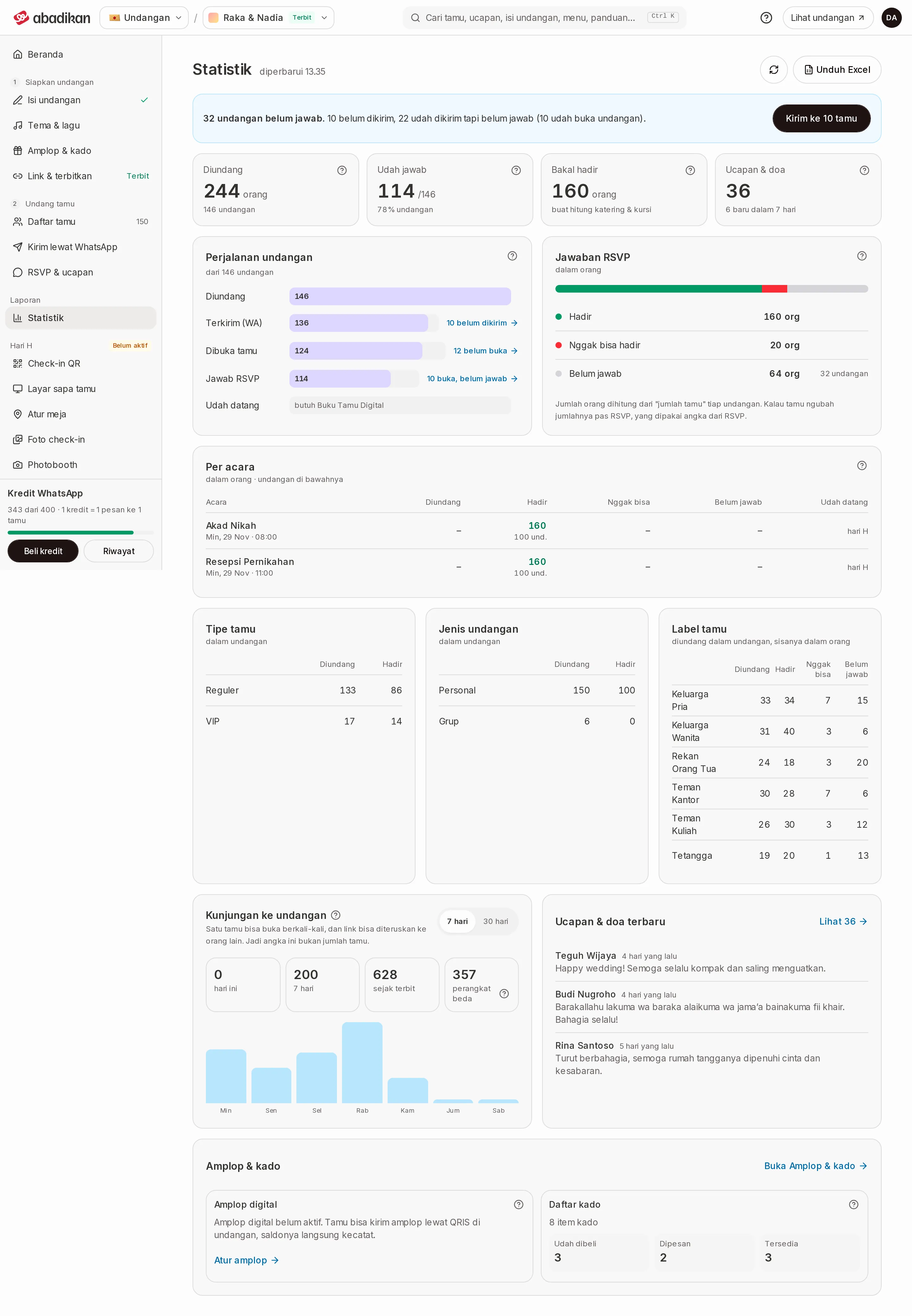
- Situation — one sentence about where your invitation stands now, plus one next-step button.
- Four headline numbers — Invited, Answered, Coming, Wishes.
- Invitation journey and RSVP answers, side by side on a laptop.
- Per event — only if your invitation has events shown on the RSVP.
- Guest type, Invitation type, and Guest labels — only the ones that have data.
- Invitation visits and Latest wishes.
- Envelopes & gifts — a summary of digital envelopes and the gift list, see Envelopes & gifts.
- Event day — shown depending on the conditions in Event day card.
At the top right you see "updated" with the time the numbers were last fetched, a reload icon (Reload numbers), and a Download Excel button. The last two only appear once you have guests.
Situation
The blue box above the numbers. It says one of these:
| Sentence | Meaning | Button |
|---|---|---|
| "… invitations haven't answered." followed by details, such as "24 not sent yet" or "10 sent but not answered" | Some invitations still have no RSVP answer. | Send to … guests while some are not sent. Once all are sent: Remind … guests. |
| "All … invitations have answered. … people are coming." | Every invitation has answered. | See who's coming |
The button opens the guest list already filtered to those guests. From there you can send via WhatsApp.
Four headline numbers
The big number counts people, the small number under it counts invitations. One invitation can cover several people (a couple, a family, or a group).
| Card | Meaning | Notes |
|---|---|---|
| Invited | Everyone on the guest list, in people. | The number of invitations is written below. |
| Answered | Invitations that picked Coming or Can't come on the RSVP, out of all invitations. | The percentage is always of invitations, so it never goes above 100%. |
| Coming | People from guests who answered Coming, including those they bring. | Use this number for catering and seating. You can click it to open the guest list of those who are coming. |
| Wishes | Wishes guests sent through the invitation. | Below it: how many are new in the last 7 days. |
Another number people often ask about, Not answered (people on invitations that haven't filled in the RSVP), is on the RSVP answers card. Details on that card and on Invitation journey are in Guest statistics.
Question mark
The ? icon next to a card title or number opens a short explanation of that number. On a phone, tap the icon; on a laptop, click it. Use it when you're unsure whether a number counts people or invitations.
Latest wishes
Shows the three newest wishes: guest name, time, and message. When there are wishes, the See … link at the top right opens all of them in the wishes tab of the RSVP page. If there are none, it says "No wishes from guests yet." How to read and manage wishes is in Guest wishes.
Envelopes & gifts
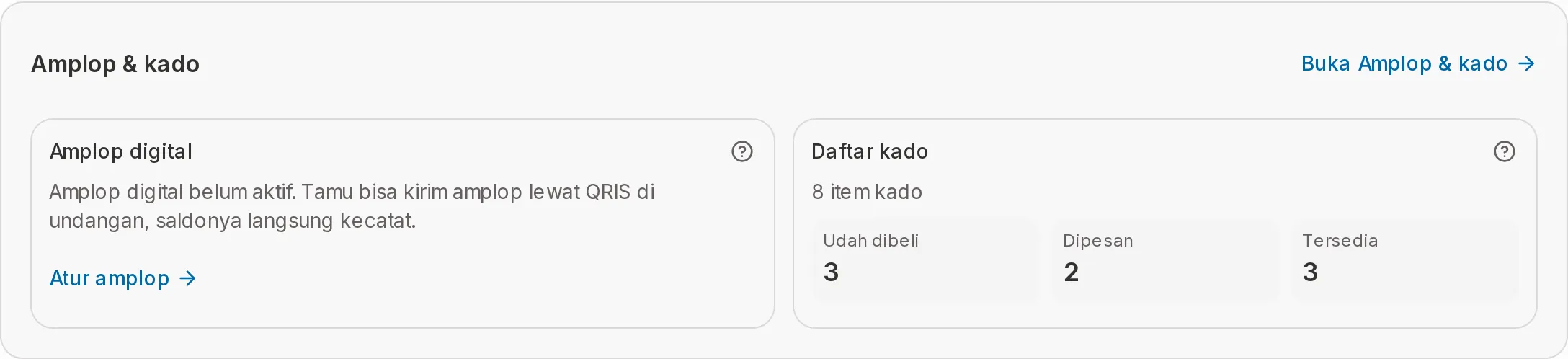
The Envelopes & gifts card sits below Invitation visits and Latest wishes. The Open Envelopes & gifts link at the top right opens the Envelopes & gifts page. The card has two parts:
| Part | What it shows |
|---|---|
| Digital envelopes | The total in rupiah of envelopes guests paid by QRIS on the invitation, and "from … envelopes" (the number of transactions). It is the same figure as envelopes received on the Envelopes & gifts page. Direct transfers to your manual accounts aren't tracked here. |
| Gift list | The number of gift items, then three numbers: Bought, Reserved, and Available. |
If a part isn't set up yet, the card doesn't show a bare 0. You see a prompt and a link to where you set it up:
- Digital envelopes are off: "Digital envelopes are off. Guests can send an envelope by QRIS on the invitation and it's tracked automatically." with a Set up envelopes link.
- The gift list is empty: "Your gift list is empty. Add the gifts you'd like so guests don't buy the same thing twice." with an Add gifts link.
A part that isn't included in your plan is marked Not in your plan with a lock icon, plus a note about the plans that include it: the automatic digital envelope and the gift list are part of the Janjian and Full Custom plans. If both parts are locked, the Envelopes & gifts card doesn't show at all. How to set them up is in Automatic digital envelope (QRIS) and Gift list (Gift Registry).
Event day card
The Event day card compares people who checked in with people who said they're coming ("… of … people who said they're coming"), with a percentage, a per-event breakdown, and the number of guests who have left. The Open check-in button takes you to the QR check-in page.
- Below the percentage bar there is a Gifts brought row ("of … checked-in guests") with three numbers: Envelope, Gift, and Not recorded. The staff record it at check-in, counted in guests (invitations). A guest who brought both an envelope and a gift counts in both. Not recorded means the staff ticked nothing. The row shows once guests have checked in. How the staff record it is in Record guest arrivals at the venue.
- The card shows when the event-day add-on (Digital Guestbook) is on, and either someone has checked in or the event is happening today.
- On the event day the card moves to the very top with a LIVE label.
- If the add-on is off, the Arrived row in Invitation journey says "needs the Digital Guestbook". How to turn it on is in Activate the Digital Guestbook.
- Before the event day, Arrived is simply empty ("fills in on the day").
Download Excel
The Download Excel button prepares a file named statistics-<invitation-link>-<date>.xlsx with four sheets: Summary, Per event, Guest labels, and Types. The numbers are the same as on the page. The Summary sheet also includes the digital envelope figures, the gift list, and the gifts brought at check-in. If it fails, you see "Couldn't create the Excel file. Please try again."
FAQ
Why haven't the numbers changed after a guest answered?
The numbers are fetched when the page opens and when the window becomes active again. Click the reload icon (Reload numbers) to get the latest.
Why is "Coming" different from "Arrived"?
Coming comes from RSVP answers and is filled in before the event. Arrived comes from check-ins at the venue and only fills in on the event day.
I see "Statistics couldn't load". What now?
Check your internet connection, then click Try again.
Next steps
- Guest statistics — Invitation journey, RSVP answers, per event, and guest splits.
- Invitation visits — How many times your invitation was opened.
- WhatsApp credits — Top up credits before sending to guests who haven't received it.