Invitation visits
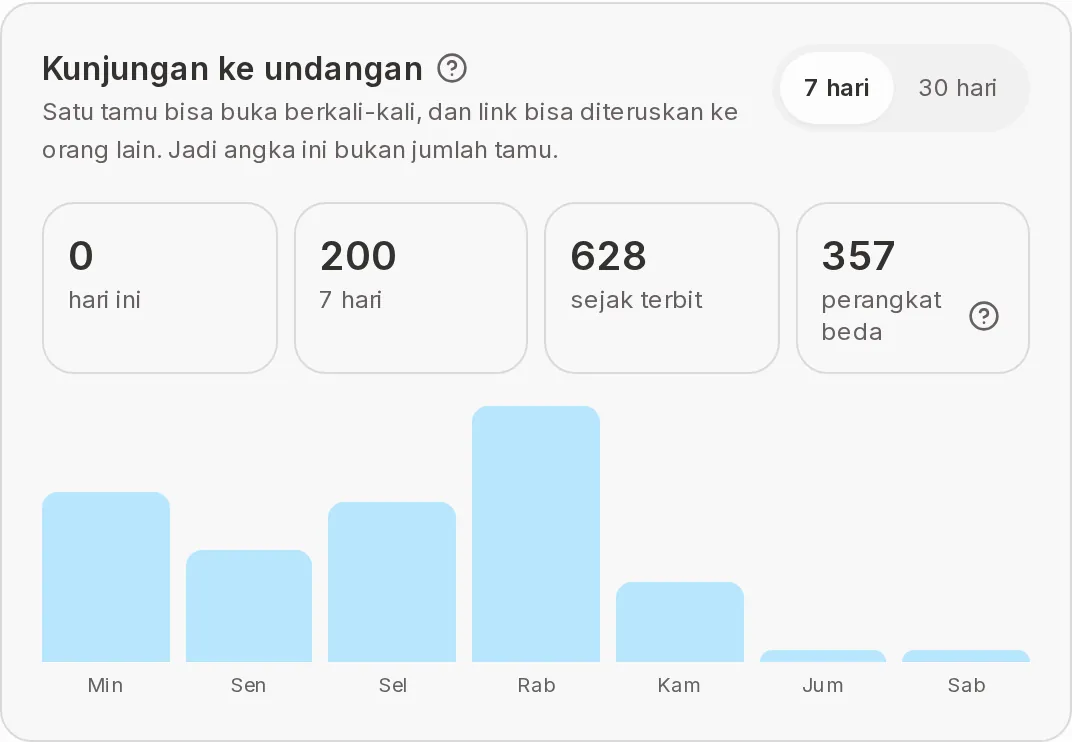
The Invitation visits card on the Statistics page shows how many times your invitation was opened. It is not the number of guests: one guest can open it many times, and links can be forwarded to other people. To see who has opened it, use Invitation journey.
Four numbers
| Term | Meaning | Notes |
|---|---|---|
| today | Visits today. | Shows "–" when the number can't be fetched. |
| 7 days | Visits in the last 7 days. | Same as the 7-day chart below it. |
| since published | All visits since the invitation was published. | Includes reopens. |
| different devices | Estimated number of different phones or laptops that opened the invitation. | Has its own ? icon. Not a count of people. |
Chart per day
Under the numbers is a bar chart with one bar per day. Choose the period with the 7 days or 30 days buttons. On a laptop, point at a bar to see the date and its visits. Bar height is compared with the busiest day in that period.
| Situation | What shows |
|---|---|
| There are visits | The bar chart. |
| No visits in the period yet | "No visits in this period yet." |
| Failed to load | "The visits chart couldn't load." |
How to read the numbers
- Far more visits than guests is normal, because reopens are counted too.
- A big gap between since published and different devices means many guests opened the invitation more than once.
- If the numbers feel low, check Opened in Invitation journey and resend to guests who haven't opened it.
Next steps
- Guest statistics — Who opened, answered, and is coming.
- Send invitations via WhatsApp — Resend to guests who haven't opened it.
Was this page helpful?