Guest statistics
The Statistics page has several cards about guests: Invitation journey, RSVP answers, Per event, and three guest-split cards. This page explains each one. Numbers on these cards can be clicked to open the guest list already filtered, so you land straight on the people behind the number.
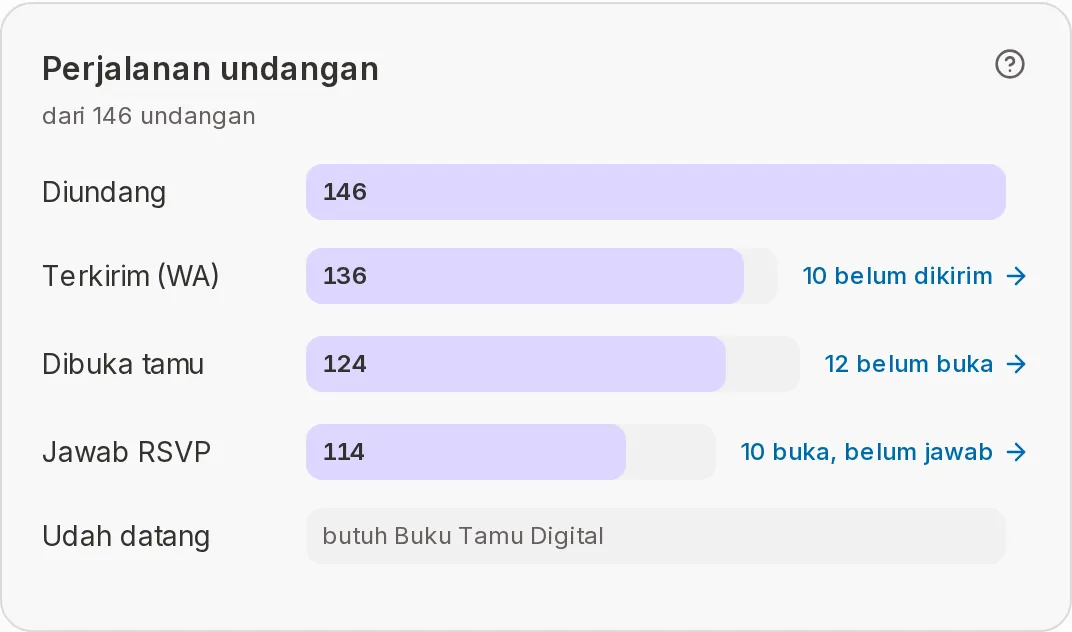
Invitation journey
This card shows the path of an invitation from sent to guest arrived. Every row is compared with the same number of invitations, so a percentage never goes above 100%.
| Row | Meaning | Notes |
|---|---|---|
| Invited | All invitations on the guest list. | The base for the other rows. |
| Sent (WA) | Invitations sent by WhatsApp from the Abadikan dashboard. | Below it: "… not sent". |
| Opened | Guests who opened their personal link at least once. | Below it: "… not opened". |
| Answered RSVP | Guests who picked Coming or Can't come. | Below it: "… opened, no answer". |
| Arrived | Guests who checked in at the venue. | Fills in on the event day and needs the Digital Guestbook. Before that it says "fills in on the day" or "needs the Digital Guestbook". |
"… not sent", "… not opened", and "… opened, no answer" are links. Click one and the guest list opens showing only those guests. The gap between rows can differ slightly from the filter, because guests can also open a link someone else forwarded. The guest list that opens is always the exact one.
RSVP answers
RSVP answers are counted in people and shown as one coloured bar and three rows.
| Row | Meaning | Notes |
|---|---|---|
| Coming | People from guests who said they'll come, including those they bring. | Opens the guest list of guests who are coming. |
| Can't come | People from guests who answered they can't come. | Opens the guest list of guests who can't come. |
| Not answered | People on invitations that haven't filled in the RSVP. | The number of invitations is written beside it. |
People are counted from each invitation's "number of guests". If a guest changes it on the RSVP, the RSVP number is used. How guests fill in the RSVP and how to see the answers is in RSVP status.
Per event
The Per event card shows when events are shown on the RSVP. Each event gets a row (on a phone: a card), with its date and time if filled in.
| Column | Meaning | Notes |
|---|---|---|
| Invited | People invited to that event. | Below it: the number of invitations ("… inv."). |
| Coming | People who answered coming to that event. | Green number. |
| Can't come | Invitations that answered they can't come to that event. | Counted in invitations. |
| Not answered | Invitations that haven't answered for that event. | Counted in invitations. |
| Arrived | People who checked in at that event. | Says "on the day" until the event day starts. |
When per-event data isn't available, the cell shows "–".
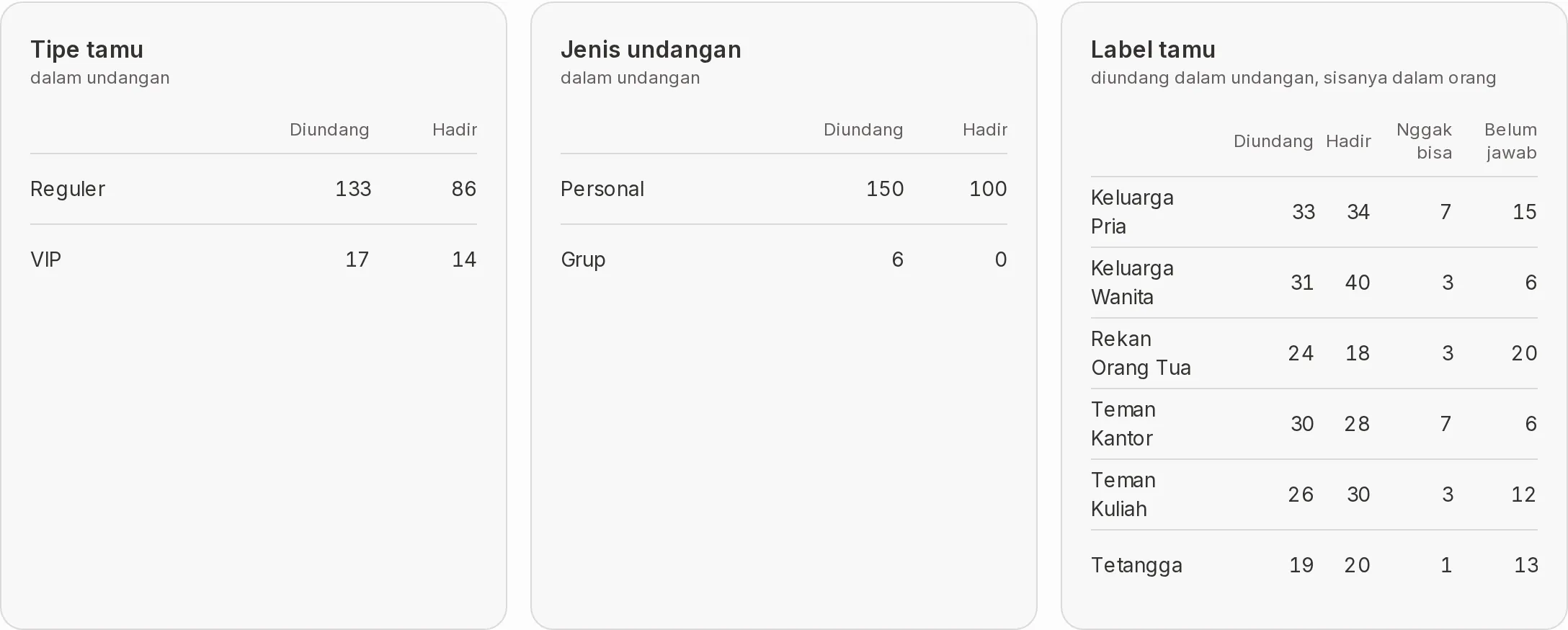
Guest type, Invitation type, and Guest labels
Three small cards split guests by what you filled in on the guest list. The size is "in invitations", except the Guest labels card, which says "invited in invitations, the rest in people". Click a row name to open the guest list filtered to that group.
| Card | Rows | Columns |
|---|---|---|
| Guest type | VIP and Regular | Invited, Coming, and Arrived |
| Invitation type | Personal and Group | Invited, Coming, and Arrived |
| Guest labels | One row per label, plus No label | Invited, Coming, Can't come, Not answered |
- The Arrived column only appears once the event day has started and the event-day add-on is on.
- A card only shows when it has content. Guest labels only appears when at least one guest has a label.
Next steps
- Guest list — Manage the guests you filtered from a number here.
- Send invitations via WhatsApp — Remind guests who haven't answered.
- Invitation visits — Check how many times your invitation was opened.